![[B] Bentley Publishers](http://assets1.bentleypublishers.com/images/bentley-logos/bp-banner-234x60-bookblue.jpg)
 Cart
Cart
Macintosh: How do I Configure Virtual Memory
-
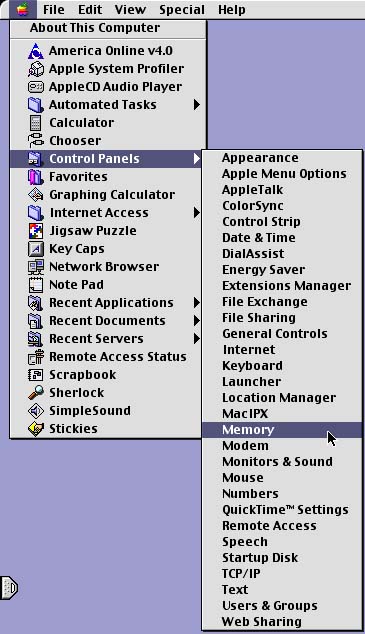
Click the Apple icon at the upper left corner of your screen. Select Control Panels from the list. Select Memory from the next list that appears to the right of the first list. Your screen will look something like this:
-
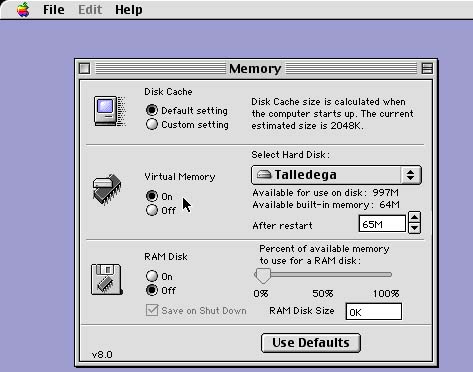
Make sure that the radio button found below the text Virtual Memory is set to On.
-
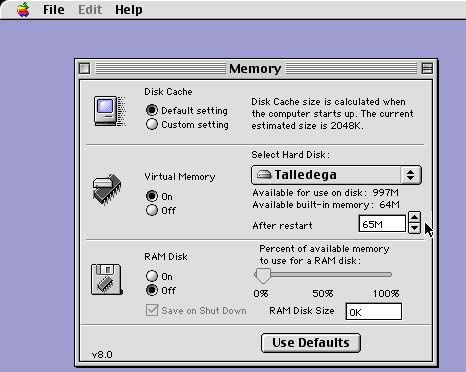
Select 65M from the pull-down list if that number is anything less than 65M. Close the dialog box.
-
Restart your computer if you had to make any changes.
Last Modified: 2000-03-27
 Facebook
 YouTube