![[B] Bentley Publishers](http://assets1.bentleypublishers.com/images/bentley-logos/bp-banner-234x60-bookblue.jpg)
 Cart
Cart
Windows 95/98/2000/NT: My Internet Service Provider is @Home and I get a "Connection Refused" error message when I run the Audi Electronic Manual.
If you are an @Home user and you installed their customized version of Netscape Navigator or Internet Explorer you will probably get an error message saying Connection Refused when you attempt to run the Audi Electronic Manual. @Home.com has preconfigured their versions of Netscape Navigator and Internet Explorer with settings that conflict with the Audi Electronic Manual.
You have a couple options:
-
Install a second browser from the Audi Electronic Manual disc.
-
Change the setting for @Home's customized browser each time you run the Audi Electronic Manual.
Change the setting for @Home's customized browser each time you run the Audi Electronic Manual.
The good news is that you can change the @Home browser settings so that it will work for both your Internet connection and the Audi Electronic Manual. The bad news is that @Home has customized your browser such that any changes you make will not be saved the next time you start the browser. Consequently, you will have to change the settings every time you run the Audi Electronic Manual.
Here is the change you will need to make:
-
Close the Audi Electronic Manual if it is currently running.
-
Start your browser if it is not already running.
-
If you are using Internet Explorer do the following:
Select Internet Options... from the Tools menu.
Select the Connections tab.
Click the LAN Settings... button.
You should see this:
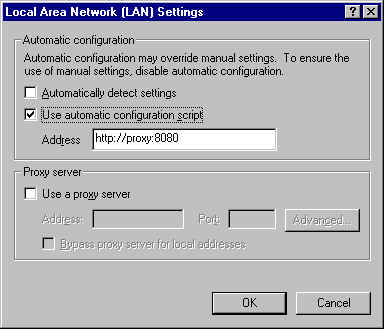
Uncheck the Use automatic configuration script option.
Your screen should look like this now:
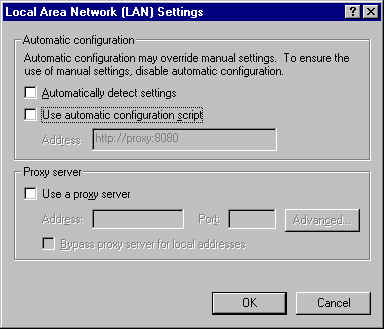
Click the OK button.
Click the Apply button.
Click the OK button.
Minimize your browser and start the Audi Electronic Manual.
Return to your browser and you should see the Audi Electronic Manual running without any error messages.
-
If you are using Netscape Navigator do the following:
Select Preferences... from the Edit menu.
Click the plus sign that appears to the left of Advanced.
Click once on Proxies.
You should see this:
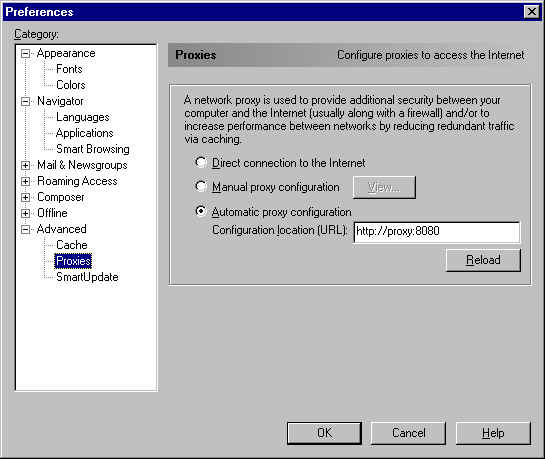
Select the Direct connection to the Internet option.
Your screen should look like this now:
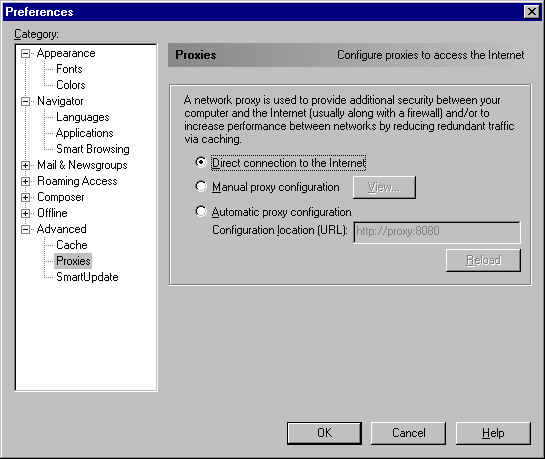
Click the OK button.
Minimize your browser and start the Audi Electronic Manual.
Return to your browser and you should see the Audi Electronic Manual running without any error messages.
Install a second browser from the Audi Electronic Manual disc.
You may want to install a second browser to use just for running the Audi Electronic Manual. We suggest that you choose a different browser than the one that you use for @Home. For example, if you installed @Home's version of Internet Explorer, install Netscape Navigator. That way, you will not have to be concerned about uninstalling the existing version first or about saving bookmarks, etc.
Here are the steps to take:
-
Insert the Audi Electronic Manual disc. It will automatically run the install program.
-
When asked to select a language, click the Cancel button to abort the install.
-
Click the Windows Start button.
-
Select Run...
-
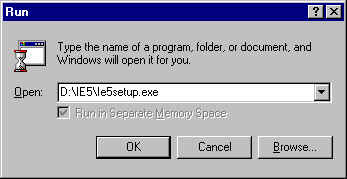
To install Internet Explorer enter the following and click the OK button.
Note: Your CD-ROM drive may be assigned a letter other than D. Click the Browse... button to locate the IE5 folder on your CD-ROM and select the filed named IE5Setup.exe.
You should now see something like this:
-
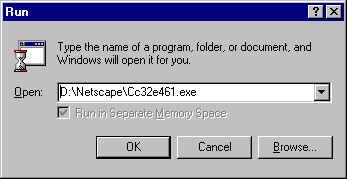
To install Netscape enter the following and click the OK button.
Note: Your CD-ROM drive may be assigned a letter other than D. Click the Browse... button to locate the Netscape folder on your CD-ROM and select the filed named Cc32e461.exe.
You should now see something like this:
-
Follow the installation instructions. If prompted whether you want to choose the browser to be your default browser choose No. You may have to restart your computer when the installation is finished.
-
To use this second browser with the Audi Electronic Manual you must start the browser first and minimize it.
Next, double-click the Audi Electronic Manual icon on your Windows desktop. Finally, maximize your browser and you should see the Audi Electronic Manual running normally.
Last Modified: 2000-01-06
 Facebook
 YouTube